
Version 1.0 Native Release · macOS Monterey, Ventura, Sonoma & Sequoia

Project management for people who value their focus.

Calm, structured, and blazing fast. Project Pro replaces chaotic cloud trackers with a keyboard-driven, offline-ready workspace crafted specifically for your Mac.

One-time purchase 100% Offline-capable Zero cloud tracking Apple Silicon native
Project Pro — Desktop Workspace
⌘K Search
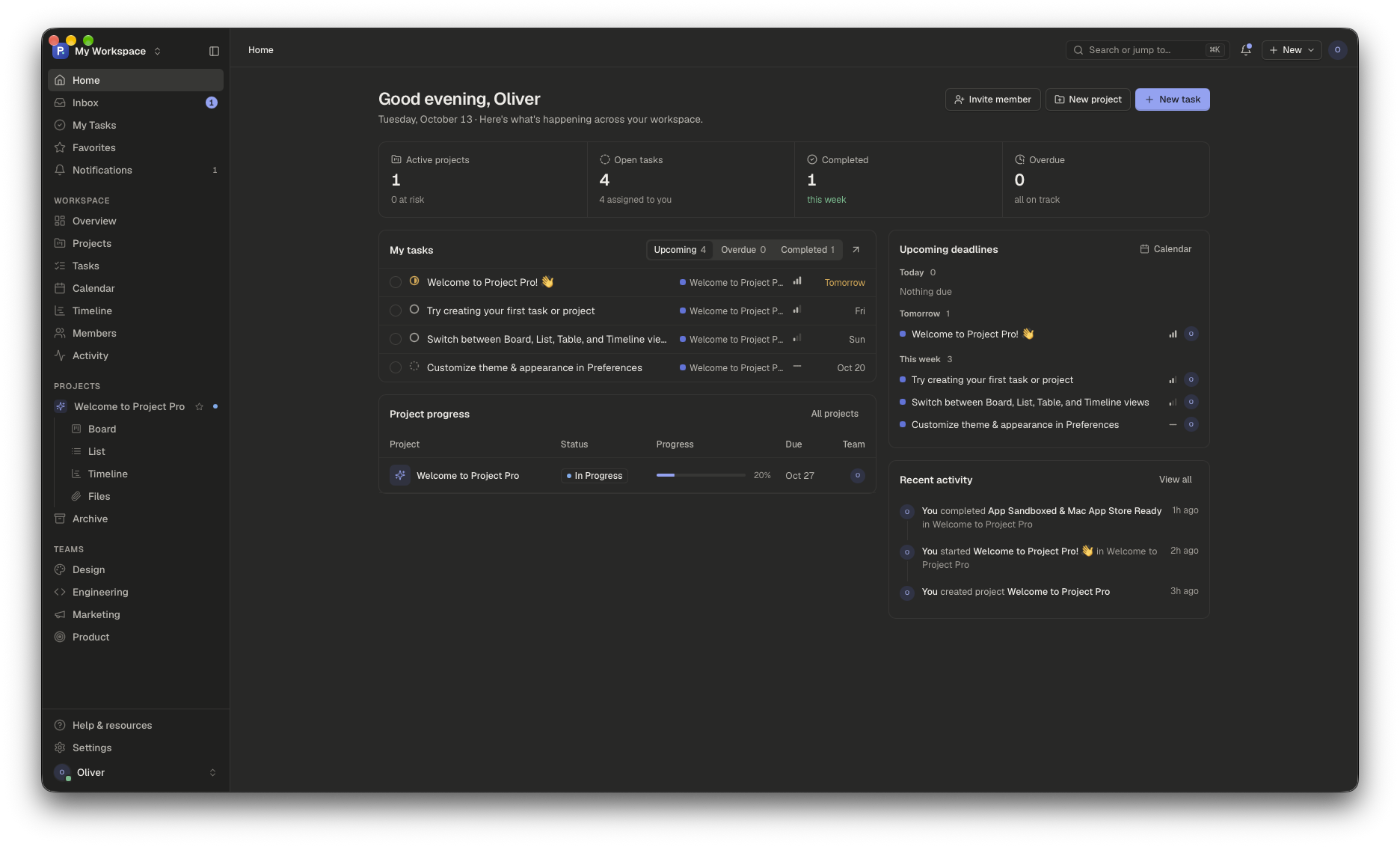
Project Pro Home Dashboard
Daily Focus Home Dashboard Agenda, priority tasks, active sprint velocity, and recent activity in one calm glance.
Tip: Press 1–5 on your keyboard to switch tabs

Sub-10ms Latency

No heavy electron frames or server roundtrips. Every tap, drag, and keystroke updates instantaneously.

100% Local & Private

Your work belongs to you. Zero telemetry, no analytics beacons, and no forced logins or cloud lock-in.

Command Palette (⌘K)

Navigate everywhere without touching the mouse. Jump to projects, triage inbox, or create tasks in seconds.

6 Native Views

Switch seamlessly between Board, List, Table, Calendar, Timeline, and Files for any project or team.

Structure without the bureaucracy.

Enterprise tools force you to adapt to their workflow. Project Pro gives you high-craft building blocks so you can get work done without getting bogged down.

Multiple Perspectives

Views that fit how you think.

Some days you need a high-level timeline for milestone planning. Other days you need a dense table to triage 50 backlog tasks or a Kanban board to move items across review. In Project Pro, they are simply different lenses on the exact same underlying data.

Kanban Board WIP limits, priority tags, assignees
Interactive Timeline Draggable milestones & sprint windows
Spreadsheet Table Batch edits, fast sorting & filters
Keyboard Velocity

Never leave your home row.

Built for engineers, designers, and keyboard-first operators. Press ⌘K to jump between workspaces, search all tasks, or trigger commands. Create tasks with C, navigate lists with J and K, and toggle details with Space.

⌘ K
Open Command Palette
C
Create New Task Anywhere
J / K
Move Selection Up / Down
Space
Open Detailed Task Drawer
Mac Architecture

Lightweight. Sandboxed. Native.

Unlike bloated Electron apps that consume 1GB of memory to show a list of checkboxes, Project Pro runs in a highly optimized native macOS WKWebView container with App Sandbox entitlements. It launches in 50 milliseconds and consumes under 40MB of RAM.

App Sandbox Apple Verified Security
Installed Footprint < 35 MB total bundle
Startup Time Instantaneous (50ms)
Calm Design System

No visual noise. Pure clarity.

Every margin, border, and color is derived from the Quire design system. Designed to keep your cognitive load low with warm parchment surfaces in light mode and deep graphite vibrancy in dark mode. No neon badges, no endless spinners.

Typography Geist + Geist Mono precision
Color Themes Native Light & Graphite Dark
Shared Gutter Pixel-perfect edge alignment

Built differently from the ground up.

See how Project Pro compares to conventional cloud-based project trackers.

Capability Project Pro Jira / Asana / ClickUp Notion
Startup Speed ✓ Instant (50ms) ✕ 3–8 seconds ✕ 2–5 seconds
Works 100% Offline ✓ Full local access ✕ Broken without WiFi ✕ Cached only / unstable
Pricing Model ✓ One-time purchase ($29) ✕ $12–$24 / seat / month ✕ $10–$18 / seat / month
Telemetry & Tracking ✓ Zero trackers or ads ✕ Full analytics tracking ✕ Usage telemetry
Keyboard Navigation ✓ ⌘K + single-key actions ✕ Partial / mouse-heavy ✕ Slash-command heavy
Memory Footprint ✓ ~35 MB ✕ 500 MB – 1.2 GB ✕ 450 MB – 800 MB

Pay once. Keep your tools.

No monthly subscription anxiety. Buy the Mac app once, or use the free local tier forever.

Community Web

Full project workspace in your browser for personal tasks and exploration.

$0 forever free
  • Home Dashboard & Today triage
  • Up to 3 active projects
  • Kanban Board & Data Table views
  • ⌘K Command Palette
  • Browser LocalStorage persistence
Launch Web Workspace

Frequently asked questions.

Everything you need to know about Project Pro, offline storage, and licensing.

Does Project Pro work completely offline?

Yes. Project Pro is designed from day one to be offline-first. Your projects, tasks, comments, and milestones are stored directly on your computer. You can plan your entire quarter on a flight or in a coffee shop without needing an active internet connection.

Is there really no monthly subscription?

Correct. We believe good tools shouldn’t rent-seek your attention every 30 days. Project Pro is a one-time purchase on macOS. You buy it once, download it, and keep it forever. You receive all minor and maintenance updates at no additional cost.

What macOS versions are supported?

Project Pro supports macOS Monterey (12.0), macOS Ventura (13.0), macOS Sonoma (14.0), and macOS Sequoia (15.0). It runs natively on Apple Silicon (M1/M2/M3/M4) as well as modern Intel Macs.

Can I try it before buying?

Yes! You can click “Live Demo” in the top bar to launch the full interactive web application directly in your browser. It contains sample projects, interactive boards, and timelines so you can test every feature immediately.

How does Project Pro protect my privacy?

Project Pro has no analytics SDKs, no behavioral trackers, and no ad libraries. Your task titles, notes, and attachments are never harvested, uploaded to third-party databases, or fed to training models. See our Privacy Policy for full details.

Where can I reach customer support or report a bug?

You can email our engineering team directly at dev@stackwares.com or visit our contact page. We respond to every email personally.

Project Pro icon

Bring calm and structure back to your work.

No noisy clutter. No 5-second spinners. Just pure, focused execution on your Mac.